
EDUCATION
Dscout Participant Guide: Applications, Missions and PayPal Rewards
A practical guide to unpaid Dscout applications, mission formats, recording requirements and PayPal rewards.
Updated November 9, 2026 · IT9X Editorial
SEO title: Dscout Participant Guide: Missions & Rewards | IT9X
Meta description: Understand Dscout applications, mission formats, device requirements, PayPal rewards and country limitations before becoming a scout.
Canonical: https://it9x.net/guides/dscout-participant-guide
Verified: 2026-11-09
Dscout recruits participants, called scouts, for mobile diary studies, live interviews, Express activities and other research missions. It can offer legitimate paid projects, but most opportunities begin with an unpaid application and selection is never guaranteed.
Quick answer
Create an account in the iOS or Android app, complete an accurate profile and apply only to missions that fit your experience. Applications are unpaid. If selected, the mission card or invitation describes the activities and reward. Dscout currently sends standard rewards through PayPal and says they should generally arrive within 10 business days after a mission closes and the entries are approved. Express availability is narrower than general missions and depends on country and response quality.
Account age and device requirements
Dscout's account guide says the minimum age is 13 in the United States and 16 in Europe. Anyone under 18 needs parent or guardian permission regardless of location. Local law can impose additional contractual requirements.
The mobile app is central to participation. Current technical guidance requires Android 9 or newer for Android devices, plus a working camera and microphone. Exact requirements vary by mission; some live sessions may also require a desktop browser or extension. Check the invitation before accepting rather than assuming one device works for every format.
Also confirm that the operating system, available storage and connection remain adequate before a multi-day mission begins; changing devices mid-project can complicate required uploads.
Country availability is not one simple list
The signup flow lets a scout select a country, but Dscout does not publish a single promise that general mission demand is equal worldwide. Researchers target specific audiences and locations, so account creation does not imply available missions.
Express missions have a separate location gate. The current Express help article says they may be absent because the scout is outside the United States or United Kingdom, while another Dscout glossary page describes Express as US-only. Because official pages are not fully aligned, IT9X treats exact Express country availability as variable and advises checking the current in-app eligibility rather than relying on a universal list.
Do not change your profile location to unlock an opportunity. Dscout explicitly says that will not make an ineligible scout qualify.
Applications are unpaid
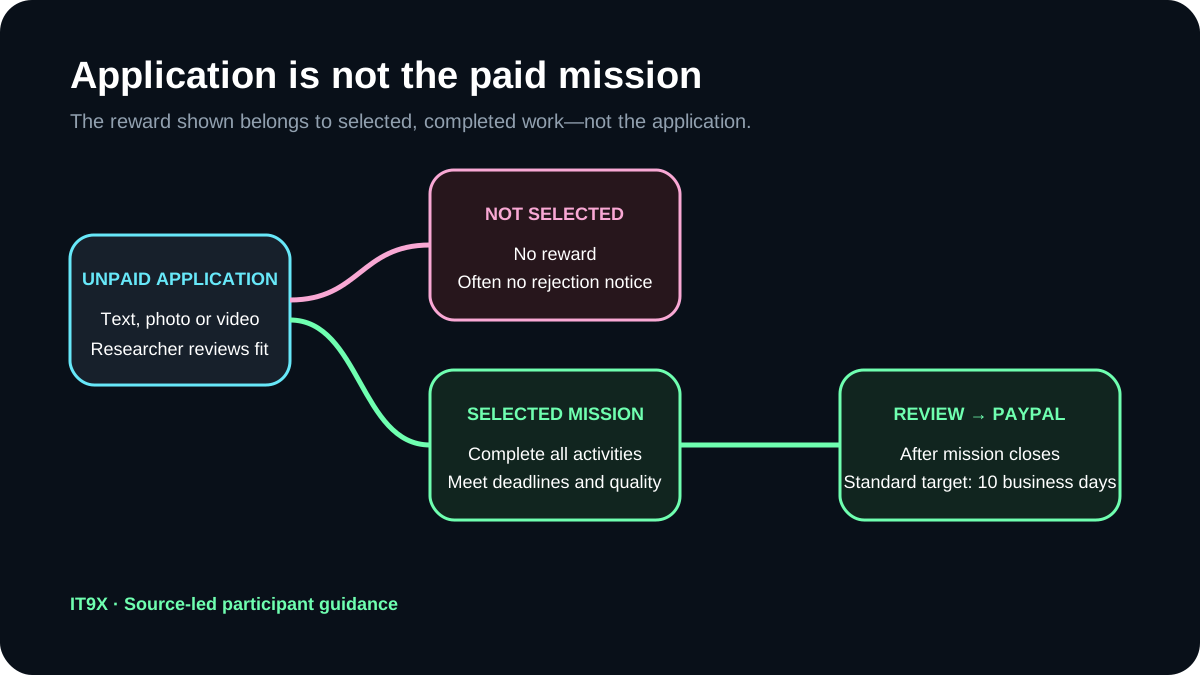
This is the most important distinction. An application is an audition used to decide whether your experience fits a mission. Dscout states that completed applications do not receive incentives. The mission card shows what the selected mission could pay, but that amount is not earned by applying.
An application can request text, photos or video. Once an answer is submitted, the app may not allow you to go back. Read each prompt first, answer truthfully and consider whether the unpaid time is proportionate to your chance of fit. The official review guide says decisions can take days or weeks and unsuccessful applicants may not receive a rejection notice.
Mission types
- Diary mission: entries across multiple days, often with media; activities, deadlines and reward vary.
- Live mission: a scheduled moderated conversation; device, length and researcher requirements vary.
- Express mission: a shorter qualification-based activity; country access, availability and automated quality approval apply.
- Externally recruited mission: an invitation through another recruiter; confirm whether Dscout or the recruiter handles payment.
The Explore tab contains applications and eligible Express opportunities. Selected missions move into the Missions area. The Rewards tab records past Dscout payments.
Recording and privacy
Dscout can request camera, microphone, location, media storage and notification permissions. Many research tasks need some of those permissions, but the exact combination depends on the activity. Review the task before granting access, remove unrelated notifications and private files from a screen recording, and avoid exposing credentials or another person's data.
Profile information can include a photo, contact information, birthday, phone number, location and demographic fields. This is useful for matching but also makes accuracy and account security important. Review IT9X's privacy guide before a recorded study.
Rewards and timing
Dscout's reward article says standard rewards are sent through PayPal and there is currently no alternative. A mission leader reviews the entries, approves completion and triggers the payment process. The expected window is within 10 business days after the mission closes, not necessarily 10 days after your last entry.
The platform publishes a broad average mission range, but individual rewards can be higher or lower and the mission card is the authoritative amount for that project. IT9X does not use the average as an earnings promise. Express missions display their own reward and require full completion plus the relevant quality check.
External recruitment is an exception: if another recruiter invited you, that organization may handle the reward. Save the invitation and confirm who is responsible before starting.
Practical scout checklist
1. Confirm the app and device meet current requirements.
2. Use your real country, age and profile information.
3. Read the mission overview before starting an application.
4. Treat every application as unpaid.
5. Record only in a quiet, private setting.
6. Follow every activity and deadline if selected.
7. Keep mission messages and completion evidence.
8. Check the Rewards tab and wait for mission closure.
9. Contact the mission leader or official support if the stated window passes.
Who Dscout may suit
Dscout may suit someone comfortable speaking on camera, documenting experiences over time and applying selectively. It is less suitable for someone who needs predictable invitations, cannot use PayPal, dislikes mobile recording or expects every screener to produce income.
See the Dscout platform profile, compare its workflow in Dscout vs Userlytics, and read about screeners and unpaid time.
FAQ
Does Dscout pay for applications?
No. Dscout explicitly describes applications as unpaid qualification steps.
How does Dscout pay?
The current participant help center lists PayPal as the standard and only Dscout reward method. External recruiters may use a different process.
Are Dscout missions available worldwide?
General demand varies by project and location. Express missions have stricter, currently inconsistent official country wording, so check the app for current eligibility.
When should a reward arrive?
Dscout says within 10 business days after the mission closes and entries are approved. The mission's exact payment message is more specific.
Is every selected mission paid?
Read the invitation. Standard Dscout missions normally display a reward, but externally recruited projects and any explicitly unpaid client-selected study can follow different terms.
Official sources
Official and primary sources
- dscoutparticipants.zendesk.comdscoutparticipants.zendesk.com · checked 2026-11-09
- dscoutparticipants.zendesk.comdscoutparticipants.zendesk.com · checked 2026-11-09
- dscoutparticipants.zendesk.comdscoutparticipants.zendesk.com · checked 2026-11-09
- dscoutparticipants.zendesk.comdscoutparticipants.zendesk.com · checked 2026-11-09
- dscoutparticipants.zendesk.comdscoutparticipants.zendesk.com · checked 2026-11-09
- dscoutparticipants.zendesk.comdscoutparticipants.zendesk.com · checked 2026-11-09
- dscoutparticipants.zendesk.comdscoutparticipants.zendesk.com · checked 2026-11-09
- dscoutparticipants.zendesk.comdscoutparticipants.zendesk.com · checked 2026-11-09
Information only. Requirements and payment terms can change; confirm the current details with the official platform.
Browse all guides